

THE INSTITUTE / RESEARCH TOPICS
Agents
What makes an agent different from automation, where it fits in a business process, and what to test before buying.
Explore this topic
Agents
The agent market spans several layers. Start with the layer you need; products often cover more than one.
Platforms
Build and manage agents around business applications. These products often combine visual builders, connections and administration.
Buying question: Does the platform support the work across all required systems, or mainly inside its own suite?
Example: Microsoft Copilot Studio ↗
Frameworks
Give engineers code for connecting models, tools and workflow steps. They offer control over how fixed logic and agent decisions fit together.
Buying question: What will your team still have to build, secure and maintain?
Runtimes
Provide the environment where agents execute. Compare how they handle sessions, saved progress, scaling and recovery.
Buying question: Can the work resume safely after a failed tool call or an interrupted run?
Example: Google Cloud Agent Runtime ↗
Observability
Trace what happened, connect it to quality checks and expose failures and costs. A record of successful tool calls is not enough to prove a correct business result.
Buying question: Can you explain and verify one completed case from beginning to end?
Choose a layer to understand the tools and buying questions.
The quick answer
An AI agent uses a model to choose actions and tools as it works toward a goal. The business question is which part of a workflow it can finish correctly, with what authority, within what time and at what total cost. A product’s “agent” label does not answer those questions.
What it is
Calling software an agent tells you something about how it chooses actions. It tells you much less about the work it can finish. Two agents using the same model can have different tools, permissions, memory and checks—and behave very differently on the same task.
The case for an agent starts when the next useful step depends on what it discovers: investigating an exception, finding missing information or working through an unfamiliar request. When the sequence and conditions are already clear, a fixed workflow may be enough. Anthropic makes this distinction in its guide to agent design.
Start with four questions. What work must be finished? Which choices can the model make? What may it change without approval? What evidence will show that it worked?
This guide covers agents built around modern AI models. It uses “agent” more narrowly than the broader computer-science category, which also includes systems built entirely from fixed rules.
Know the difference
A model can produce a probabilistic answer inside a fixed workflow. The defining question is whether the model also directs how the task proceeds. Compare three ways of handling the same email.
| System | What happens | Who chooses the route? |
|---|---|---|
| Fixed automation | An email matching a rule is sent to a queue. | Code follows conditions defined in advance. |
| AI in a workflow | Every email goes to a model for a draft, then to a person for approval. | The model writes the draft; code fixes the sequence. |
| An AI agent | The system decides which records to inspect, whether more information is needed and which allowed action to take. | The model chooses steps within defined permissions and limits. |
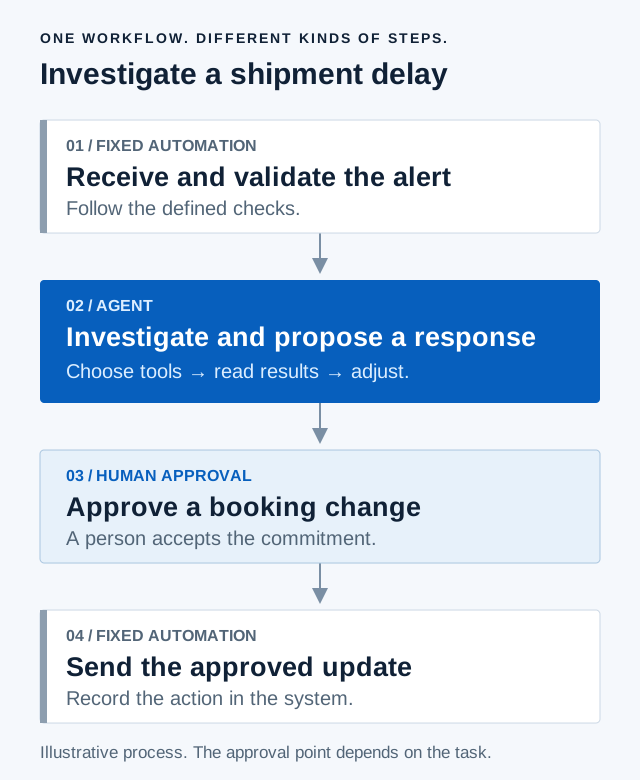
A real business process can daisy-chain these approaches. A fixed rule starts the work; an agent investigates; a person approves a commitment; fixed automation records the change. Starting from a prompt, an event or a schedule does not determine whether the system is an agent.
Source: Anthropic’s distinction between workflows and agents.
How it works
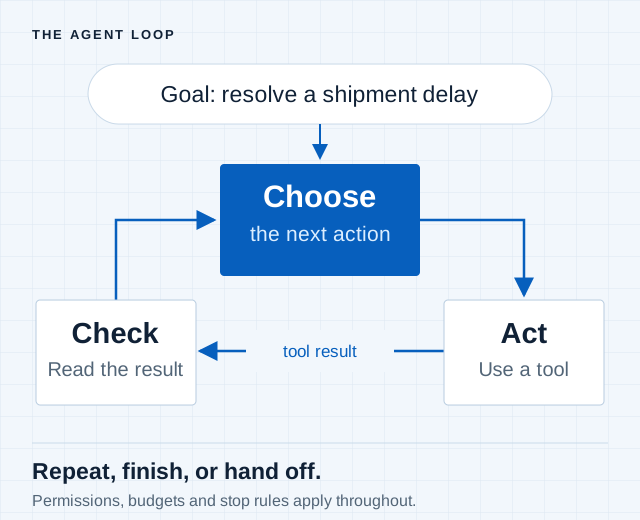
The agent’s model chooses an action, the surrounding software runs it, and the result comes back as information for the next decision. The system repeats that loop until it finishes, reaches a limit or asks for help.
- Goal Define the work and what a completed result looks like.
- Choice The model selects a next step using the information available.
- Action A tool performs an allowed operation in another system.
- FeedbackThe result informs the next choice, a stop or a handoff.
The parts around the model
| Part | What it does | What to check |
|---|---|---|
| Tools and connections | An API exposes an operation; a connector links an application to it. A tool gives the agent a capability it can call. | Which actions exist, which data they reach, and whose permissions they use. |
| Context and memory | Context is the information available now. Memory saves information that can be retrieved later. | What is retained, how it is selected and whether it is still accurate. |
| Runtime | Runs the work, keeps progress and handles interruptions. | Whether a restart can repeat an action that already succeeded. |
| Controls | Enforce permissions, approval requirements and spending or time limits. | Whether a prohibited action is actually blocked. |
| Observability | Records the steps and connects them to checks of the result. | Whether the record proves the business task was completed correctly. |
MCP, the Model Context Protocol, standardizes how an AI application discovers and uses tools and context. It does not decide the business goal or make a connected system an agent. Read the protocol’s architecture.
IBM’s overview explains the model and tool loop. Our Observability guide covers how to inspect and judge the work.
Types of tools
The agent market spans several layers. Start with the layer you need; products often cover more than one.
Platforms
Build and manage agents around business applications. These products often combine visual builders, connections and administration.
Buying question: Does the platform support the work across all required systems, or mainly inside its own suite?
Example: Microsoft Copilot Studio ↗
Frameworks
Give engineers code for connecting models, tools and workflow steps. They offer control over how fixed logic and agent decisions fit together.
Buying question: What will your team still have to build, secure and maintain?
Runtimes
Provide the environment where agents execute. Compare how they handle sessions, saved progress, scaling and recovery.
Buying question: Can the work resume safely after a failed tool call or an interrupted run?
Example: Google Cloud Agent Runtime ↗
Observability
Trace what happened, connect it to quality checks and expose failures and costs. A record of successful tool calls is not enough to prove a correct business result.
Buying question: Can you explain and verify one completed case from beginning to end?
Platforms and tools
These examples illustrate product roles. Their documentation describes capabilities; this page does not rank or independently test them.
Microsoft Copilot Studio
Platform
Builds agents and workflows using a visual interface and connections to organizational data and applications.
Inspect: The exact agent setup, available connectors, action permissions and billing model.
LangGraph
Framework and runtime
Combines fixed steps and model-led decisions in code, with saved progress and points for human intervention.
Inspect: The engineering work needed to connect systems, test behavior and operate the agent.
Google Cloud Agent Runtime
Managed runtime
Runs custom agents within Google Cloud’s agent platform, alongside services for sessions and memory.
Inspect: Access to your systems, recovery behavior and which supporting services add cost.
LangSmith
Observability and evaluation
Records agent runs and supports inspection, monitoring and feedback across supported frameworks and providers.
Inspect: Whether traces connect to outcome checks and include the external tools your agent uses.
Business uses
Choose a task small enough to define and verify. These are illustrative test cases, not claims that a product has achieved the result. For each one, agree on a deadline and measure the full cost of accepted work.
Logistics
Investigate one late shipment using tracking events, order records and carrier messages.
Agent chooses: What to investigate next and which response to propose.
Finish line: A supported option delivered before the operating cutoff.
Human approval: A booking change or new commercial commitment.
Service
Resolve one customer’s refund request using their order, messages and the applicable policy.
Agent chooses: Which records are needed and how to handle missing information.
Finish line: The account matches the approved resolution.
Human approval: Refunds or exceptions beyond its delegated authority.
Healthcare administration
Prepare one referral packet by gathering authorized records and flagging missing administrative information.
Agent chooses: Which allowed records to check and what information is missing.
Finish line: Staff can verify the packet against the required checklist.
Human approval: Clinical judgments and exceptions remain with qualified staff.
Procurement
Review one proposed supplier against the buying team’s requirements and available product evidence.
Agent chooses: Which documents to inspect and which gaps need follow-up.
Finish line: A sourced comparison ready for the buying decision.
Human approval: Supplier selection and contract terms.
Benefits and costs
The potential benefit is less time spent gathering information and working through variable steps. Whether that saves money depends on what happens after the first attempt: review, corrections, retries and exceptions.
Cost per accepted outcome
Total workflow cost ÷ tasks completed to the agreed standard.
Count the cost of failed attempts in the total. Include software, model and tool calls, infrastructure, implementation, human review and ongoing support. Comparing token prices alone leaves much of the job unpriced.
| Measure | Why it matters |
|---|---|
| Accepted completion rate | How often the actual work passes the agreed check. |
| Time to completion | Whether the result arrives before it stops being useful. |
| Human minutes per case | How much work has shifted into supervision and repair. |
| Cost per accepted outcome | What it costs to finish useful work, including failed attempts. |
Compare the agent with today’s process on the same cases and deadline. These are evaluation measures, not a claim of observed savings.
Limits and risks
An agent reaches its practical limit when it cannot obtain reliable information, perform an allowed action or check whether the work succeeded. It can also keep moving while being wrong. A confident explanation is not a completion record.
| Capability | What it helps with | What it does not establish |
|---|---|---|
| More reasoning time | More opportunity to plan, inspect or retry. | That the extra steps improve this task enough to justify their cost. |
| Persistent state | Resuming work after a pause or failure. | That an earlier action was correct or safe to repeat. |
| Memory | Reusing relevant information from earlier work. | That the saved information is accurate, current or appropriate to retrieve. |
| Continuous operation | Starting or continuing work without a fresh prompt. | That the system can finish long tasks reliably. |
Human review needs a defined job. Specify what the reviewer checks, what evidence they see and what they can stop or reverse. “Human in the loop” alone does not explain how an error will be caught.
Set time and spending limits, log consequential actions, and test failures before extending the agent’s authority. See Agent Observability for the records and checks this requires.
What the evidence shows
EXTERNAL RESEARCH · METR
Ask “how reliably?” before “how long?”
METR’s time horizon estimates the difficulty of tasks an agent can complete at a stated success rate. Difficulty is expressed as the time a human expert would need to do the work. It is not the agent’s running time.
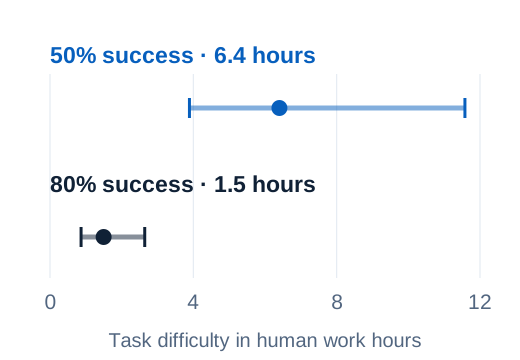
For this model, the estimated horizon drops from 6.4 hours at 50% success to 1.5 hours at 80% success. The comparison shows why a horizon without a success threshold leaves out a central part of the result. It is not a model recommendation or a forecast of performance on your workflow.
What the evidence covers: Mainly software engineering, machine learning and cybersecurity tasks. METR introduced Time Horizon 1.1 as a suite of 228 tasks; that count describes the task suite, not people or test runs. Task-time estimates and model results carry uncertainty.
Source status: METR’s time-horizons page was last updated September 8, 2026 and says it is no longer actively updated. Chart values were retrieved October 24, 2026 and rounded from minutes to hours.
Benchmark and interpretation ↗ · Chart data ↗ · Task-suite method ↗
Use this in a buying test: State the task, required success rate and deadline together. Then measure actual elapsed time, human effort and cost on that task.
How we assess it
This is the first stage of category research: define the technology, distinguish it from neighboring approaches, map the product roles and identify what a buyer must test. Sources and documented capabilities are separated from our evaluation questions. The latter are an Institute assessment approach, not a validated benchmark.
For the next stage, choose a real workflow and agree on its input data, allowed actions, completion test, deadline and cost boundary. Use the same cases to compare today’s process with candidate systems. Include failures, interrupted runs and cases that need a person. Preserve the model, prompt, tool and product versions used.
The executive brief explains the business trade-off. The engineer’s implementation playbook records connections, permissions, tests, recovery and handoffs. Both come from the same evidence; neither can replace the other.
Questions before you buy
For the executive
- Which task are we delegating, and why does it need an agent?
- What counts as finished, by when and at what cost?
- Which decisions can the system make without a person?
- What result would justify buying, expanding or stopping the deployment?
For the engineer
- Can we reach the required data and actions under the right permissions?
- How do we verify the resulting record, transaction or customer outcome?
- What happens after a timeout, an interruption or a repeated tool call?
- What evidence and controls does a human reviewer receive?
Engineers should influence selection with evidence about feasibility, reliability and operating cost. Executives set the business requirements and accept the trade-offs. Keep both contributions visible in the decision.
Common questions
Does a prompt make it less of an agent?
No. A prompt, event or schedule can start the task. The distinction is whether the model chooses how to proceed after that.
Can an agent have deterministic steps?
Yes. Fixed validation, approval rules and transactions can surround probabilistic model decisions. A business workflow often combines both.
Does connecting email or an API create an agent?
It creates access. To act as an agent in the sense used here, the system also needs to choose and carry out steps toward the task. The same connection can serve a fixed workflow.
Does a benchmark tell us how long it can work alone?
Only if that is what the benchmark measures. METR’s time horizon measures task difficulty using human completion time at a stated success rate. It is not a promise of uninterrupted autonomous work.
Where should we start?
Choose one task with available data, limited authority and a result you can check. Agree on the deadline and cost boundary before testing tools. Expand only when the evidence supports it.
Sources and reading
- Anthropic — Building effective agentsDefinition and the distinction between agent decisions and predefined workflows. Published December 19, 2024; some tooling references have changed.
- IBM — AI agentsModel, tool and feedback components. Its broader taxonomy also includes agents based on fixed rules.
- Model Context Protocol — ArchitectureHow AI applications discover and call tools and obtain context. MCP does not prescribe the application’s decisions.
- METR — Task-completion time horizonsExternal benchmark and methodology. The source page was last updated September 8, 2026 and is no longer actively maintained.
- METR — Time Horizon 1.1Task-suite composition, changes to the method and uncertainty in the estimates.
Product documentation is linked in the product cards. Capabilities described there have not been independently tested for this page. Business cases and workflow diagrams are illustrative. Evaluation questions express our proposed approach; each Institute report states the method and evidence behind its own findings.
What changed
October 24, 2026: Reworked the guide around task, authority, completion and cost. Added an email comparison, a component checklist, task-specific evaluation cases, a sourced METR chart and a direct branch to Agent Observability.